Lighting Fundamentals
Lighting Fundamentals
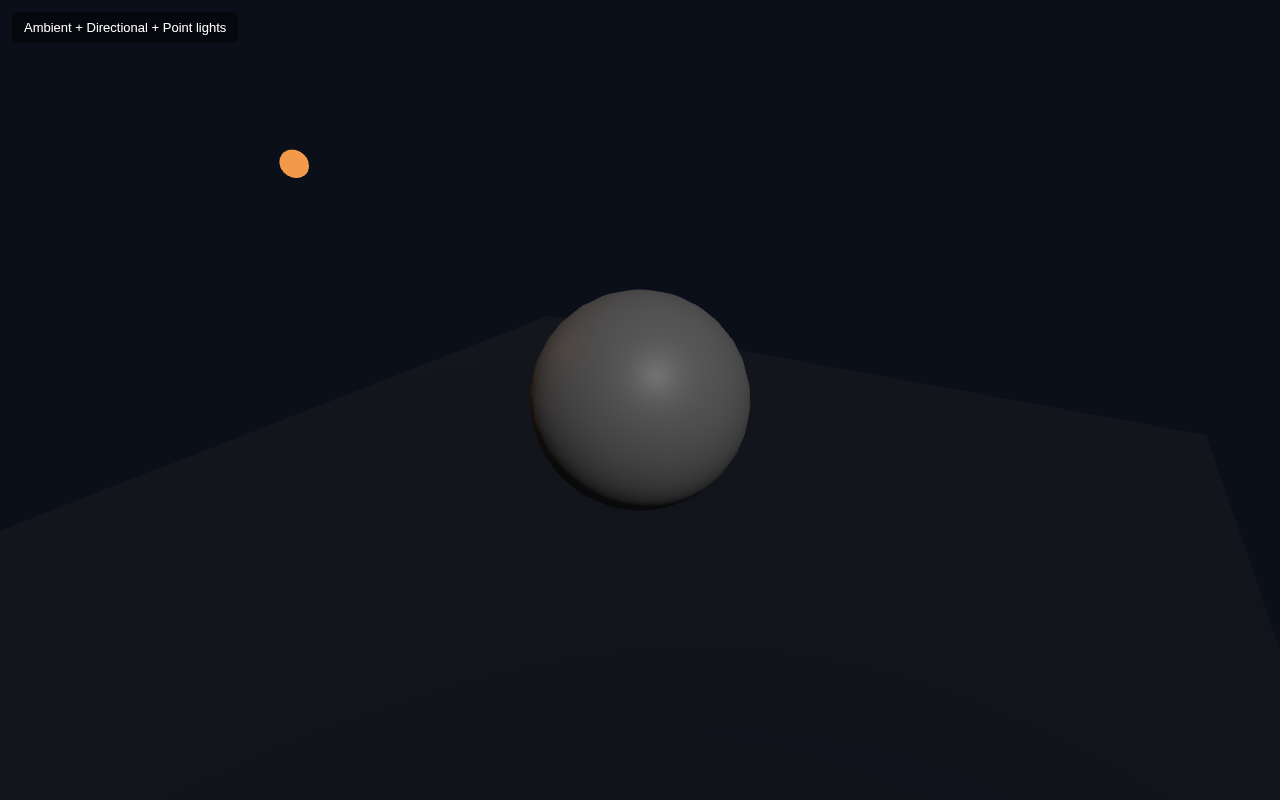
Lights are what make a 3D scene feel real. Without them your Standard or Lambert materials render as flat black shapes. This lesson introduces the three most common light types and shows how each one contributes to a scene: AmbientLight, DirectionalLight and PointLight.
The Three Lights
| Light | Origin | Feel |
|---|---|---|
| AmbientLight | everywhere, no direction | base fill so nothing is pure black |
| DirectionalLight | parallel rays from a direction | like sunlight; big soft shading |
| PointLight | one glowing point, fades with distance | like a light bulb |
Full Example
<!DOCTYPE html>
<html lang="en">
<head>
  <meta charset="UTF-8">
  <meta name="viewport" content="width=device-width, initial-scale=1.0">
  <title>Three.js – Lighting Fundamentals</title>
  <style>body{margin:0;overflow:hidden;background:#0b0f1a}
    #ui{position:absolute;top:12px;left:12px;color:#fff;font:13px sans-serif;z-index:10;background:rgba(0,0,0,.45);padding:8px 12px;border-radius:6px}</style>
</head>
<body>
  <div id="ui">Ambient + Directional + Point lights</div>
  <script type="importmap">
    { "imports": {
        "three": "https://unpkg.com/three@0.160.0/build/three.module.js",
        "three/addons/": "https://unpkg.com/three@0.160.0/examples/jsm/"
    } }
  </script>
  <script type="module">
    import * as THREE from 'three';    const scene = new THREE.Scene();
    scene.background = new THREE.Color(0x0b0f1a);    const camera = new THREE.PerspectiveCamera(60, innerWidth / innerHeight, 0.1, 1000);
    camera.position.set(3, 2.5, 5);
    camera.lookAt(0, 0, 0);    const renderer = new THREE.WebGLRenderer({ antialias: true });
    renderer.setSize(innerWidth, innerHeight);
    document.body.appendChild(renderer.domElement);    scene.add(new THREE.AmbientLight(0x404040, 0.6));    const dir = new THREE.DirectionalLight(0xffffff, 0.9);
    dir.position.set(4, 5, 3);
    scene.add(dir);    const point = new THREE.PointLight(0xf2994a, 1, 20);
    point.position.set(-3, 2, 1);
    scene.add(point);    const bulb = new THREE.Mesh(
      new THREE.SphereGeometry(0.12, 16, 16),
      new THREE.MeshBasicMaterial({ color: 0xf2994a })
    );
    bulb.position.copy(point.position);
    scene.add(bulb);    const geo = new THREE.SphereGeometry(1, 32, 16);
    const mat = new THREE.MeshStandardMaterial({ color: 0x9b9b9b, roughness: 0.5, metalness: 0.1 });
    const sphere = new THREE.Mesh(geo, mat);
    scene.add(sphere);    const ground = new THREE.Mesh(
      new THREE.PlaneGeometry(10, 10),
      new THREE.MeshStandardMaterial({ color: 0x1c2436 })
    );
    ground.rotation.x = -Math.PI / 2;
    ground.position.y = -1.2;
    scene.add(ground);    function animate() {
      requestAnimationFrame(animate);
      renderer.render(scene, camera);
    }
    animate();
  </script>
</body>
</html>
How Each Light Contributes
AmbientLight. new THREE.AmbientLight(color, intensity) adds a soft base level of light from every direction. Its purpose is to lift the darkest shadows just enough that nothing is pure black. We use 0x404040 at 0.6 — a dim neutral grey.
DirectionalLight. new THREE.DirectionalLight(color, intensity) emits parallel light rays from a direction. It behaves like the sun: the object gets strong shading on one side and a clear dark side. It has a position only so Three.js knows which way the rays point.
PointLight. new THREE.PointLight(color, intensity, distance) emits from a single point and fades with distance (the third argument is the reach). We place it at (-3, 2, 1) and it casts warm orange light onto the left of the sphere. To make the light source visible we add a tiny glowing MeshBasicMaterial sphere at its exact position — a common trick.
Because MeshStandardMaterial needs light, the sphere is grey and shows off all three lights at once: ambient fill, a strong directional highlight on the right, and a warm point-light tint on the left.
Try It Yourself
- Turn off the point light (
point.visible = false) and watch the warm tint disappear from the sphere's left. - Change the directional light colour to
0xffaaffto see coloured light. - Remove the ambient light — the dark side of the sphere becomes almost black.
- Increase
AmbientLightintensity to1.5and the scene flattens out (everything brightens evenly).
Summary
AmbientLight fills dark areas evenly, DirectionalLight adds sun-like parallel shading, and PointLight emits from a point and fades with distance. Materials like Standard need lights to be visible, so a scene usually combines several of them for a natural look.
Next Lesson
With shapes, materials and lights in place, the next chapter starts moving things. The next lesson covers transforms — position, rotation and scale — so you can place and arrange objects in 3D space.
Quiz - Quiz - Lighting
1. Which light fills a scene evenly from every direction?
2. DirectionalLight is similar to
3. A PointLight