Primitive Geometries: Six Shapes in One Scene
Primitive Geometries: Six Shapes in One Scene
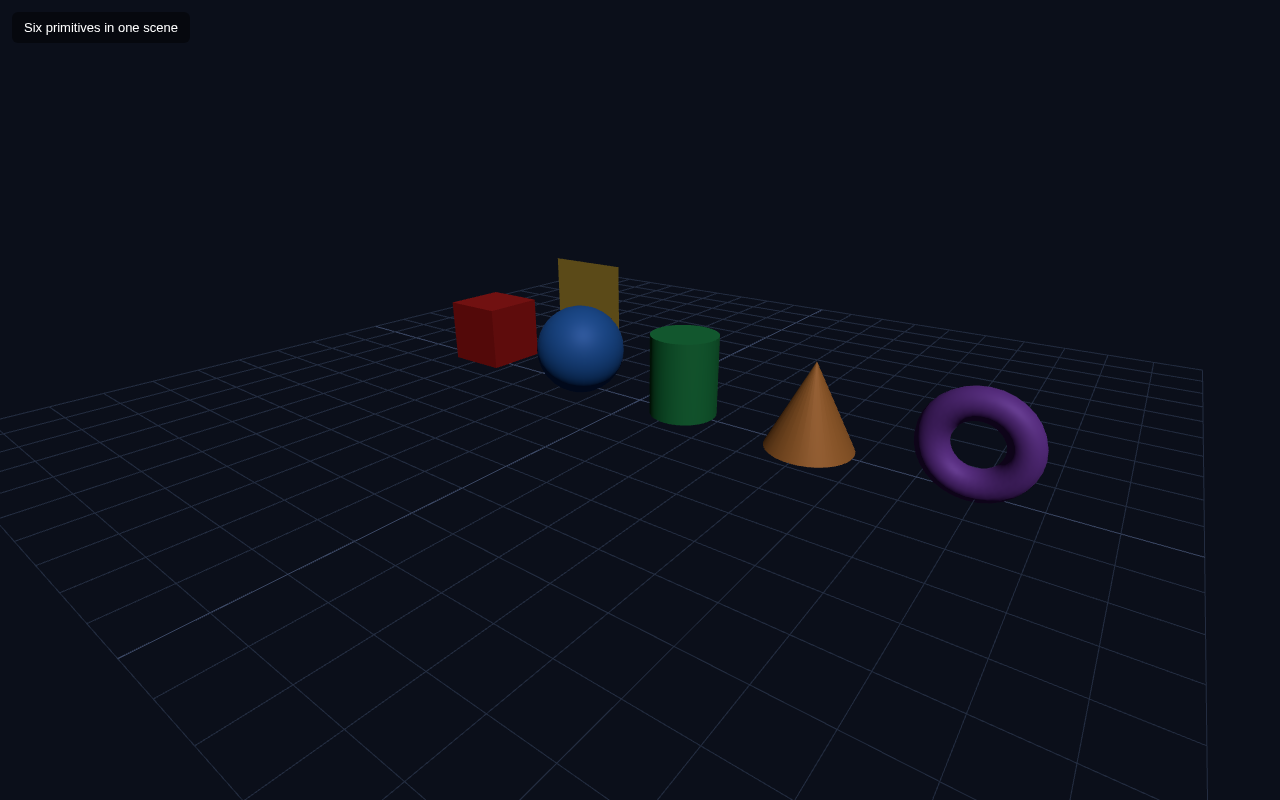
Modeling starts here. Three.js ships a set of built-in primitive geometries — simple, ready-made shapes you can use as building blocks for anything. In this lesson you place six of them side by side in a single scene: box, sphere, cylinder, cone, torus and plane.
The Six Primitives
Each geometry is constructed with parameters that describe its size:
| Geometry | Constructor | Notes |
|---|---|---|
| Box | BoxGeometry(w, h, d) | rectangular solid |
| Sphere | SphereGeometry(r, segmentsW, segmentsH) | smooth ball |
| Cylinder | CylinderGeometry(radiusTop, radiusBottom, h, segments) | tube or pole |
| Cone | ConeGeometry(radius, h, segments) | pointed cone |
| Torus | TorusGeometry(radius, tube, radialSeg, tubularSeg) | donut ring |
| Plane | PlaneGeometry(w, h) | flat 2D square |
segments makes a shape smoother (more triangles) at a small cost of performance — 32 is plenty for a smooth sphere.Full Example
<!DOCTYPE html>
<html lang="en">
<head>
  <meta charset="UTF-8">
  <meta name="viewport" content="width=device-width, initial-scale=1.0">
  <title>Three.js – Primitive Geometries</title>
  <style>body{margin:0;overflow:hidden;background:#0b0f1a}
    #ui{position:absolute;top:12px;left:12px;color:#fff;font:13px sans-serif;z-index:10;background:rgba(0,0,0,.45);padding:8px 12px;border-radius:6px}</style>
</head>
<body>
  <div id="ui">Six primitives in one scene</div>
  <script type="importmap">
    { "imports": {
        "three": "https://unpkg.com/three@0.160.0/build/three.module.js",
        "three/addons/": "https://unpkg.com/three@0.160.0/examples/jsm/"
    } }
  </script>
  <script type="module">
    import * as THREE from 'three';    const scene = new THREE.Scene();
    scene.background = new THREE.Color(0x0b0f1a);    const camera = new THREE.PerspectiveCamera(60, innerWidth / innerHeight, 0.1, 1000);
    camera.position.set(6, 4, 8);
    camera.lookAt(0, 0, 0);    const renderer = new THREE.WebGLRenderer({ antialias: true });
    renderer.setSize(innerWidth, innerHeight);
    document.body.appendChild(renderer.domElement);    scene.add(new THREE.AmbientLight(0x404040));
    const dir = new THREE.DirectionalLight(0xffffff, 1);
    dir.position.set(4, 6, 3);
    scene.add(dir);
    scene.add(new THREE.GridHelper(14, 20, 0x3a4763, 0x232c40));    const shapes = [
      { geo: new THREE.BoxGeometry(1, 1, 1),                   x: -3.2 },
      { geo: new THREE.SphereGeometry(0.7, 32, 16),            x: -1.2 },
      { geo: new THREE.CylinderGeometry(0.5, 0.5, 1.2, 32),    x: 0.8 },
      { geo: new THREE.ConeGeometry(0.6, 1.2, 32),             x: 2.8 },
      { geo: new THREE.TorusGeometry(0.5, 0.2, 16, 32),        x: 4.8 },
      { geo: new THREE.PlaneGeometry(1.6, 1.6),                x: -3.2, z: -2.5 }
    ];    const colors = [0xe02424, 0x2f80ed, 0x27ae60, 0xf2994a, 0x9b51e0, 0xf2c94c];    shapes.forEach((s, i) => {
      const mat = new THREE.MeshStandardMaterial({ color: colors[i], metalness: 0.2, roughness: 0.6 });
      const mesh = new THREE.Mesh(s.geo, mat);
      mesh.position.set(s.x, 0.6, s.z || 0);
      scene.add(mesh);
    });    function animate() {
      requestAnimationFrame(animate);
      renderer.render(scene, camera);
    }
    animate();
  </script>
</body>
</html>
How the Scene Comes Together
The example keeps the lesson-1 skeleton and handles the six shapes as data. Each entry in the shapes array holds a geometry and a target x (and optional z) position. A forEach loop builds a MeshStandardMaterial with a distinct colour, binds each geometry to it, positions it, and adds it to the scene.
This "array of things to build" pattern is extremely useful — instead of writing six blocks of near-identical code, you describe six rows and let a loop do the work. It is also exactly how the scene graph in a later lesson (the solar system) gets more elaborate.
Notice the plane is positioned with z: -2.5 through the s.z || 0 fallback, so it sits behind the other shapes rather than overlapping. Any shape that has no z uses 0.
Try It Yourself
- Change
SphereGeometry(0.7, 32, 16)to(0.7, 8, 6)— it becomes visibly faceted, a low-poly sphere. - Make the torus bigger:
TorusGeometry(0.7, 0.3, 16, 32). - Add a seventh shape, e.g.
TetrahedronGeometry(0.8)orDodecahedronGeometry(0.8). - Rotate the scene in the browser if you added OrbitControls, or just change the camera
positionto view the shapes from another angle.
Summary
Primitive geometries are the ready-made building blocks of Three.js modeling. You learned the main ones, how their parameters control size and smoothness, and a clean loop-based pattern for filling a scene with many objects.
Next Lesson
All six shapes currently share the same kind of material. The next lesson explores materials themselves — how Basic, Lambert and Standard differ, and why Standard needs lights while Basic ignores them.
Quiz - Quiz - Primitive Geometries
1. Which is NOT a primitive geometry class in Three.js?
2. What does increasing the segment count of a sphere do?
3. TorusGeometry(radius, tube, ...) - the second parameter 'tube' controls