Scene Graph: A Mini Solar System
Scene Graph: A Mini Solar System
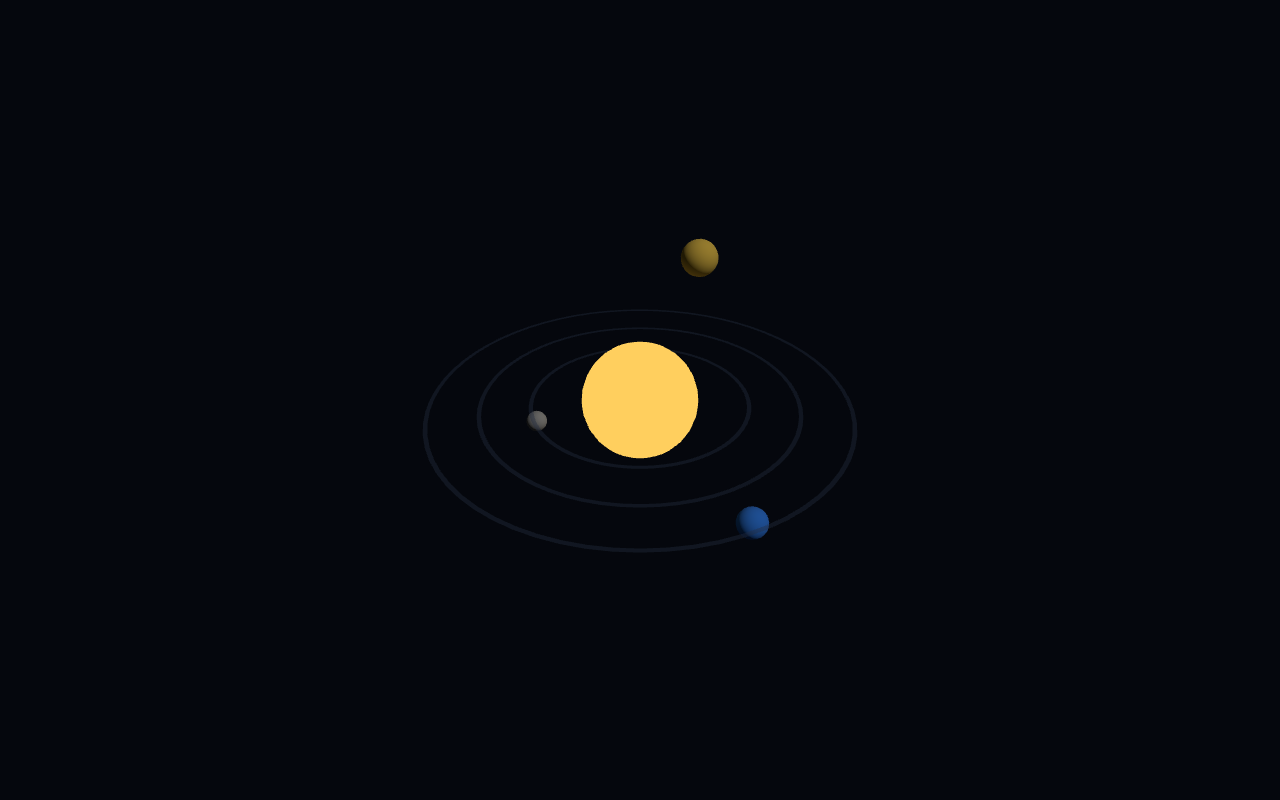
The scene graph is the hierarchy that holds every object in a Three.js scene. Objects can be children of other objects, and a child moves, rotates and scales with its parent. This is the key to building complex systems — here it powers a miniature solar system where planets orbit a glowing sun.
The Big Idea: Parenting
Put a planet inside an empty Group (the "orbit"). Rotate the group and the planet revolves around the group's centre — no complex path math needed. The planet effectively inherits the orbit's rotation while we only ever move the group.
Full Example
<!DOCTYPE html>
<html lang="en">
<head>
  <meta charset="UTF-8">
  <meta name="viewport" content="width=device-width, initial-scale=1.0">
  <title>Three.js – Mini Solar System</title>
  <style>body{margin:0;overflow:hidden;background:#05070d}</style>
</head>
<body>
  <script type="importmap">
    { "imports": {
        "three": "https://unpkg.com/three@0.160.0/build/three.module.js",
        "three/addons/": "https://unpkg.com/three@0.160.0/examples/jsm/"
    } }
  </script>
  <script type="module">
    import * as THREE from 'three';    const scene = new THREE.Scene();
    scene.background = new THREE.Color(0x05070d);    const camera = new THREE.PerspectiveCamera(60, innerWidth / innerHeight, 0.1, 1000);
    camera.position.set(0, 9, 14);
    camera.lookAt(0, 0, 0);    const renderer = new THREE.WebGLRenderer({ antialias: true });
    renderer.setSize(innerWidth, innerHeight);
    document.body.appendChild(renderer.domElement);    scene.add(new THREE.AmbientLight(0x404040));
    const dir = new THREE.DirectionalLight(0xffffff, 1);
    dir.position.set(5, 8, 4);
    scene.add(dir);    const sunLight = new THREE.PointLight(0xffe6b3, 2, 40);
    scene.add(sunLight);
    const sun = new THREE.Mesh(
      new THREE.SphereGeometry(1.4, 32, 16),
      new THREE.MeshBasicMaterial({ color: 0xffcf5e })
    );
    scene.add(sun);    function makeOrbit(radius, size, color, speed) {
      const orbit = new THREE.Group();
      const planet = new THREE.Mesh(
        new THREE.SphereGeometry(size, 24, 12),
        new THREE.MeshStandardMaterial({ color })
      );
      planet.position.x = radius;
      orbit.add(planet);
      scene.add(orbit);
      const ring = new THREE.Mesh(
        new THREE.RingGeometry(radius - 0.05, radius + 0.05, 64).rotateX(-Math.PI / 2),
        new THREE.MeshBasicMaterial({ color: 0x232c40, transparent: true, opacity: 0.4 })
      );
      scene.add(ring);
      return { group: orbit, speed };
    }    const mercury = makeOrbit(2.6, 0.25, 0x9b9b9b, 0.9);
    const venus   = makeOrbit(3.8, 0.4,  0xf2c94c, 0.7);
    const earth   = makeOrbit(5.0, 0.45, 0x2f80ed, 0.5);    const clock = new THREE.Clock();
    function animate() {
      requestAnimationFrame(animate);
      const t = clock.getElapsedTime();
      mercury.group.rotation.z = t * mercury.speed;
      venus.group.rotation.z = t * venus.speed;
      earth.group.rotation.z = t * earth.speed;
      sun.rotation.y = t * 0.2;
      renderer.render(scene, camera);
    }
    animate();
  </script>
</body>
</html>
Building One Orbit
The reusable makeOrbit(radius, size, color, speed) function builds one planet system:
1. Create an empty Group — this is the invisible "orbit".
2. Create the planet mesh and set planet.position.x = radius — parked at the correct distance on the X axis.
3. orbit.add(planet) makes the planet a child of the orbit.
4. scene.add(orbit) adds the whole system to the scene.
5. Draw a semi-transparent ring (RingGeometry) on the ground to show the orbital path.
Because the planet is a child of the orbit, when we later write orbit.rotation.z = ..., the planet circles the sun. Its own position never changes — it just inherits the orbit's motion. That is the essence of parenting.
Orbiting in the Loop
Each frame we rotate each orbit around Z (t * speed), so every planet revolves at its own speed (Mercury fastest, Earth slowest — matching reality). The sun independently spins slowly, and a PointLight at the centre casts warm light onto the planets.
Try It Yourself
- Add Mars:
makeOrbit(6.2, 0.38, 0xeb5757, 0.4). - Make Earth orbit the other way:
mercury.group.rotation.z = -t * mercury.speed. - Give a planet a moon: inside
makeOrbit, add a tiny sphere positioned on X and rotate a second group. - Change orbital radii and watch planets cross in and out of view.
Summary
The scene graph lets objects inherit their parent's transforms. By nesting a planet inside a rotating Group, you get realistic orbital motion with almost no math. Groups + time-based rotation is a pattern you will reuse in the final capstone project.
Next Lesson
Your scenes are now moving and arranged. The next chapter brings interaction: the Raycaster lets you click exactly which object in the scene you want to pick up and highlight.
Quiz - Quiz - Scene Graph
1. To make a planet orbit a sun, the cleanest approach is to
2. In a scene graph, a child object
3. The material that emits its own light without needing a light source is