Materials: Basic, Lambert and Standard
Materials: Basic, Lambert and Standard
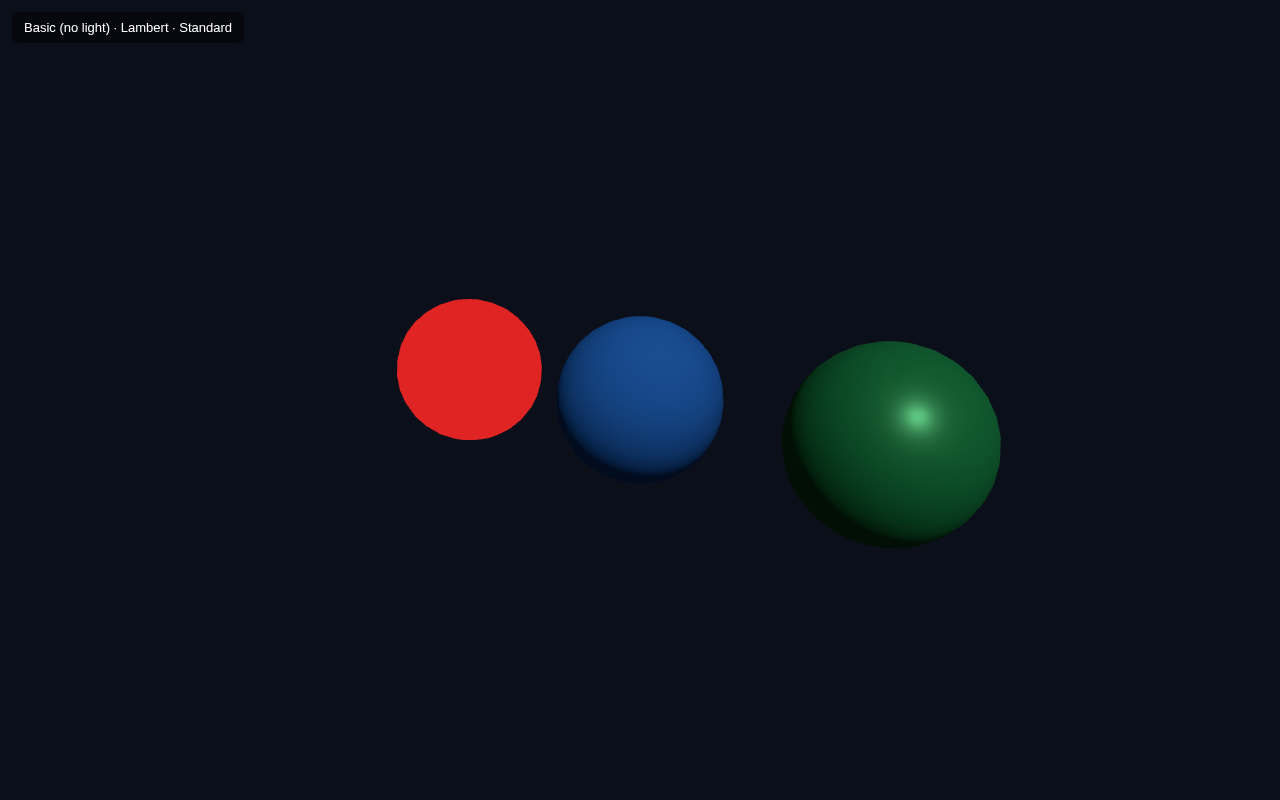
A geometry gives an object its shape, but its material decides how it looks — its colour, shininess, whether it reacts to light, and more. This lesson compares three common materials by putting a sphere with each one side by side: MeshBasicMaterial, MeshLambertMaterial and MeshStandardMaterial.
Why Material Choice Matters
The big difference is how they interact with light:
| Material | Needs light? | Look | Use |
|---|---|---|---|
| MeshBasicMaterial | No | flat, unlit, one solid colour | UI, wireframes, debug, glowing bits |
| MeshLambertMaterial | Yes | simple matte diffuse shading | cheap, fast, low-detail surfaces |
| MeshStandardMaterial | Yes | realistic PBR (metalness/roughness) | realistic surfaces, most objects |
metalness and roughness controls for realistic results.Full Example
<!DOCTYPE html>
<html lang="en">
<head>
  <meta charset="UTF-8">
  <meta name="viewport" content="width=device-width, initial-scale=1.0">
  <title>Three.js – Materials</title>
  <style>body{margin:0;overflow:hidden;background:#0b0f1a}
    #ui{position:absolute;top:12px;left:12px;color:#fff;font:13px sans-serif;z-index:10;background:rgba(0,0,0,.45);padding:8px 12px;border-radius:6px}</style>
</head>
<body>
  <div id="ui">Basic (no light) · Lambert · Standard</div>
  <script type="importmap">
    { "imports": {
        "three": "https://unpkg.com/three@0.160.0/build/three.module.js",
        "three/addons/": "https://unpkg.com/three@0.160.0/examples/jsm/"
    } }
  </script>
  <script type="module">
    import * as THREE from 'three';    const scene = new THREE.Scene();
    scene.background = new THREE.Color(0x0b0f1a);    const camera = new THREE.PerspectiveCamera(60, innerWidth / innerHeight, 0.1, 1000);
    camera.position.set(4, 2, 6);
    camera.lookAt(0, 0, 0);    const renderer = new THREE.WebGLRenderer({ antialias: true });
    renderer.setSize(innerWidth, innerHeight);
    document.body.appendChild(renderer.domElement);    scene.add(new THREE.AmbientLight(0x404040));
    const dir = new THREE.DirectionalLight(0xffffff, 1);
    dir.position.set(4, 5, 3);
    scene.add(dir);    const geo = new THREE.SphereGeometry(0.9, 32, 16);    const basic = new THREE.MeshBasicMaterial({ color: 0xe02424 });
    const m1 = new THREE.Mesh(geo, basic);
    m1.position.x = -2.6;
    scene.add(m1);    const lambert = new THREE.MeshLambertMaterial({ color: 0x2f80ed });
    const m2 = new THREE.Mesh(geo, lambert);
    m2.position.x = 0;
    scene.add(m2);    const standard = new THREE.MeshStandardMaterial({ color: 0x27ae60, metalness: 0.3, roughness: 0.4 });
    const m3 = new THREE.Mesh(geo, standard);
    m3.position.x = 2.6;
    scene.add(m3);    function animate() {
      requestAnimationFrame(animate);
      renderer.render(scene, camera);
    }
    animate();
  </script>
</body>
</html>
Reading the Screenshot
Look at the three spheres from left to right:
- Left (Basic, red): perfectly flat and evenly lit — it does not care about the lights at all. There is no highlight or dark side.
- Middle (Lambert, blue): clearly shaded — the lit side facing the directional light is bright and the far side falls into shadow.
- Right (Standard, green): the most realistic — diffuse shading plus subtle specular highlights and a soft look, thanks to
metalnessandroughness.
SphereGeometry), which proves the difference in appearance comes entirely from the material.The Metalness / Roughness Duo
MeshStandardMaterial uses physically based rendering (PBR). Its two main sliders:
- metalness: 0 = non-metal (like plastic or stone), 1 = polished metal.
- roughness: 0 = mirror smooth, 1 = completely rough/matte.
metalness: 1, roughness: 0.2. A dull rubber ball is metalness: 0, roughness: 0.9.Try It Yourself
- Change the Standard sphere to
metalness: 1, roughness: 0.1— it turns shiny and mirror-like. - Set the material's
wireframe: trueto see the underlying triangles. - Make the Basic material
transparent: true, opacity: 0.5to see through it. - Add a point light near the spheres and watch Lambert and Standard pick it up while Basic stays unchanged.
Summary
The material controls appearance and light interaction. MeshBasicMaterial is fast and unlit, MeshLambertMaterial gives simple shading, and MeshStandardMaterial provides realistic PBR with metalness and roughness. Pick the material that fits the look you need.
Next Lesson
Since Lambert and Standard need light to look right, the next lesson dives into lighting itself — ambient, directional and point lights — and how they shape your scene.
Quiz - Quiz - Materials
1. Which material ignores lights and renders as a flat colour?
2. MeshStandardMaterial uses the two PBR properties
3. Which material gives the most realistic, physically-based shading?
4. metalness = 0 means the surface behaves like